
Need a hand?
Where is my progress saved?
On your phone, with a backup copy on our game server linked to an anonymous game account. Tap SAVE YOUR GAME to link a username and password, and you can get it back on another phone.
How do I restore purchases?
Rhinestones are bought through Google Play or the App Store and credited to your game account. If one is missing, tap SEND FEEDBACK in the game (Settings, SAVE) with the store, purchase date and order reference. Never send payment-card details.
How do I report a bug or leave feedback?
In the game: tap the tin can at the top right (it says TELL US) - a bug, something confusing, something fun, an idea - or go to Settings > SEND FEEDBACK (tap your face at the top left, then SAVE). It attaches a screenshot and your phone details for you. Older version of the game? It is the BUG? tape in the same corner.
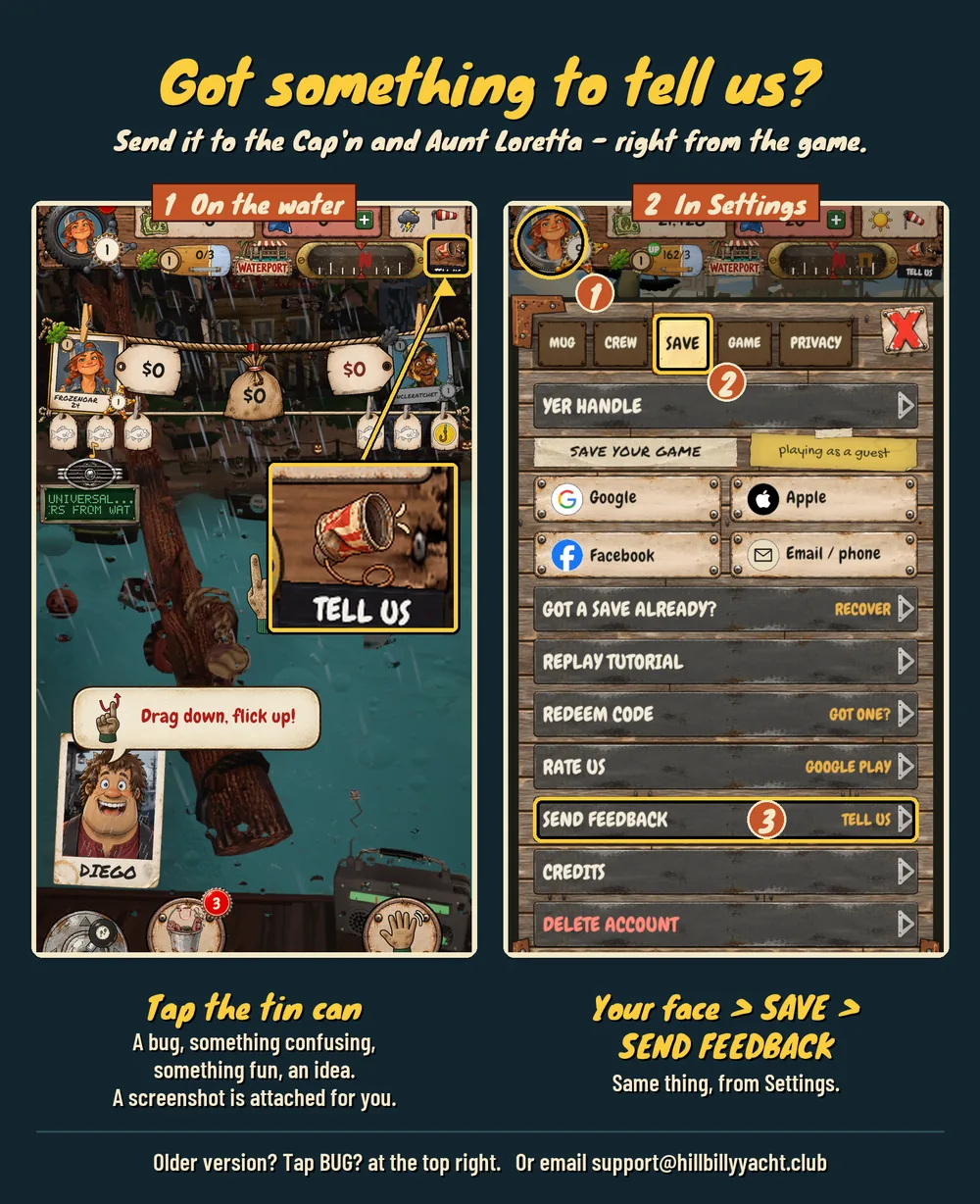
Reports need an email on your game account so Aunt Loretta can write back. The first time you report, the game asks for one: a one-tap Google sign-in, or a 6-digit code we mail you. Please do not include passwords or payment details.
Beta tester? Here is what helps us most
Your first 5 minutes are gold. You only see the game fresh once. Before you get used to it, take a step back and jot down what confused you, where you got stuck, what was fun and what was not. Then leave us a quick review in those first minutes too (Settings > RATE US), and send what you jotted down through the can phone.
How a report works: tap the can phone (TELL US) and type what happened in your own words. The game attaches a screenshot of where you were. Then tap + ADD PHOTO to add up to 3 pictures from your phone. Want to point at one exact spot? Take a phone screenshot, circle the spot in your phone's photo editor, and add that picture.
One report per problem. If several things are really the same problem (the same button acting up on every screen), put them in one report. Anything different gets its own report, so each one can be tracked and fixed on its own.
Following up: Aunt Loretta writes back in the game and by email. Just reply to that email to add more - more detail, screenshots, even a short screen recording. A big video may be too large to come through, so share a Google Drive or YouTube link to it instead.
Got a tester code? Redeem it in the game under Settings > REDEEM CODE.
How do I delete my data?
You can ask us to delete your game account, cloud save and reports. We will do it within 30 days. Read the deletion instructions.
Search all the questions about fishing, chests, poles and your crew.